Here's how to download Instagram data in about two minutes of tapping: request only Followers and following, in JSON, for All time. That small file is everything you need to see who unfollowed you, who doesn't follow you back and your newest followers. Menu names shift a little between app versions; the path below matches the current Meta Account settings and the older Accounts Center.
How to download Instagram data, step by step
In the Instagram app on iPhone or Android. The highlighted item is the one to tap; grey bars are other menu items you can ignore.
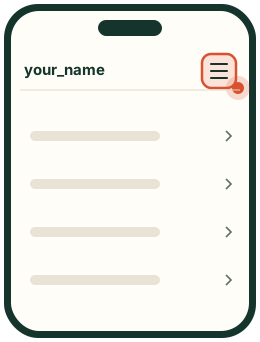
Step 1
Open the menu
In the Instagram app, go to your profile and tap the menu (three lines) at the top right.
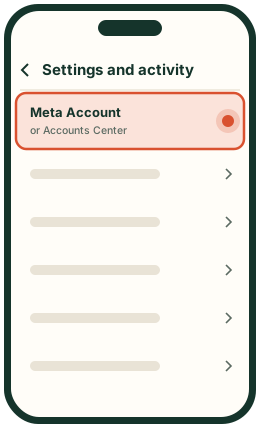
Step 2
Tap Meta Account
It's at the top of Settings and activity. Some accounts still show Accounts Center: same place, old name.
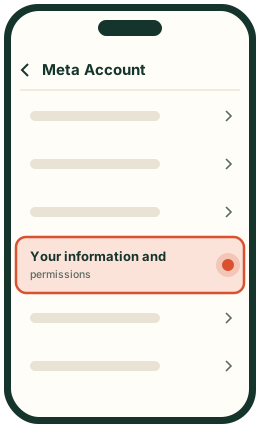
Step 3
Open Your information and permissions
It's in the list inside Meta Account.
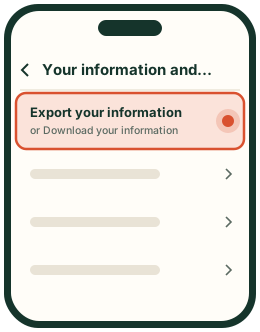
Step 4
Tap Export your information
Some versions call it Download your information.
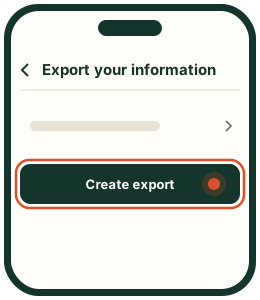
Step 5
Tap Create export
This starts a new export. Older exports listed here may be expired.
Step 6
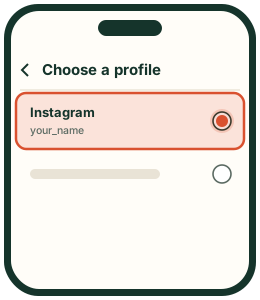
Pick your Instagram profile
If you have several profiles, pick the account you want to check.
Step 7
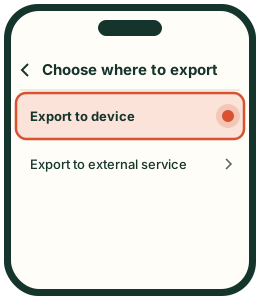
Choose Export to device
The file comes straight to you, not to another service.
Step 8
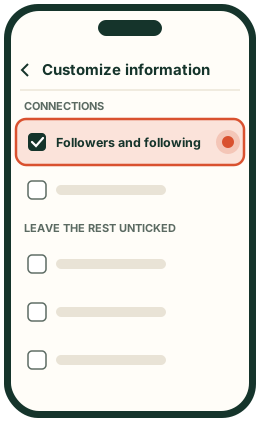
Tick only Followers and following
Tap Customize information, tick Followers and following under Connections, and leave everything else unticked so the file stays small.
Step 9
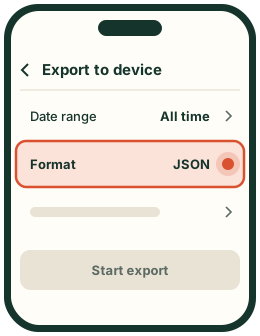
Set All time and JSON, then start
Set Date range to All time and Format to JSON, then tap Start export (or Create files).
Step 10
Download the ZIP when it's ready
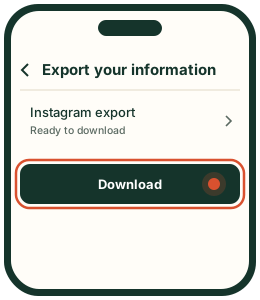
Instagram notifies and emails you, usually within minutes. Come back to Export your information, tap Download and confirm with your password. Keep the ZIP as it is.
The four choices that matter
Export to device
Only Followers and following (under Connections)
Date range: All time
Format: JSON (HTML works too)
Photos, videos, messages and every other category
These four choices are the whole secret of how to download Instagram data quickly. A full export with photos and videos can be several gigabytes and take much longer; Followers and following alone is small.
How to download Instagram data on a computer
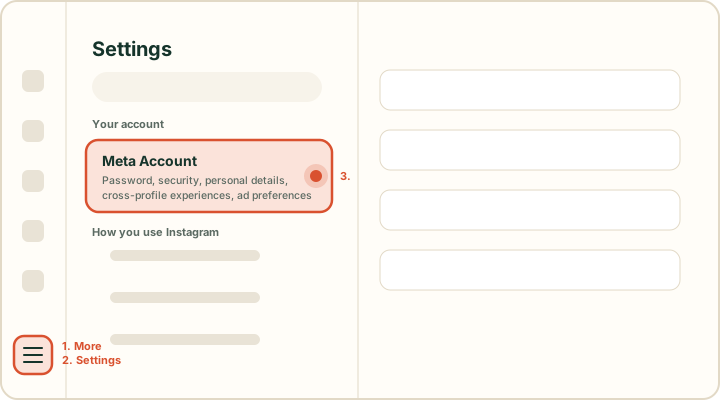
On instagram.com: More, then Settings, then Meta Account.
On desktop: instagram.com → More (the three lines, bottom left) → Settings → Meta Account (at the top, under Your account) → Your information and permissions → Export your information. From there, steps 5 to 10 are the same as in the app. The finished ZIP lands in your Downloads folder, ready to drop into the checker.
Can't find Accounts Center?
Meta is replacing Accounts Center with Meta Account, announced in April 2026 and rolling out gradually, so some accounts show the new name and some the old one. Look for Meta Account in Settings, described as "Password, security, personal details, cross-profile experiences, ad preferences". Inside it, Your information and permissions and the export work the same way.
What's inside the file
The ZIP has a folder named connections/followers_and_following (older exports skip the first folder). Inside:
File
What it lists
followers_1.json (and _2, _3 for big accounts)
Everyone who follows you, with the date they followed
following.json
Everyone you follow, with the date you followed them
pending_follow_requests.json
Requests you sent to private accounts that are still pending
Follow requests you sent to private accounts that are still pending.
Frequently asked questions
How do I use my Instagram data to see who unfollowed me?
Download Instagram data with only the follower lists selected (step 8 above), in JSON, and drop the ZIP on Unfollowers Tool. The first file becomes your baseline; a newer export later shows exactly who unfollowed you. You also see who doesn't follow you back on the first upload.
When you download Instagram data with only the follower lists selected, it is usually ready within minutes, sometimes a couple of days for large accounts or busy periods. You get a notification and an email when it is ready.
Should I choose JSON or HTML?
Choose JSON. It is smaller and keeps exact follow dates. HTML exports work with Unfollowers Tool too.
Why can't I download Instagram data?
The usual causes: the export is still being prepared, the download link expired (download it within a few days), you picked the wrong profile in Meta Account (Accounts Center), or the email went to spam. Check Download your information for the status, or request a new export.
Do I need to unzip the file?
No. Drop the ZIP as Instagram sent it. Unfollowers Tool opens only the follower files inside and skips photos and videos.
Why does Instagram ask for my password when I download?
That is Instagram confirming it's you, on Instagram's own page. Unfollowers Tool never asks for your password.